
The Hidden Cost of Fewer Tokens: Why context efficiency makes the Playwright CLI slower
No one disputes that coding agents are more powerful when they use tools, but which tools are best is the topic of active debate. Playwright is an automation library for controlling a browser via code, originally for end-to-end testing. The Playwright MCP, or (since January) the Playwright CLI, has become a common tool for coding agents to interact with browsers.
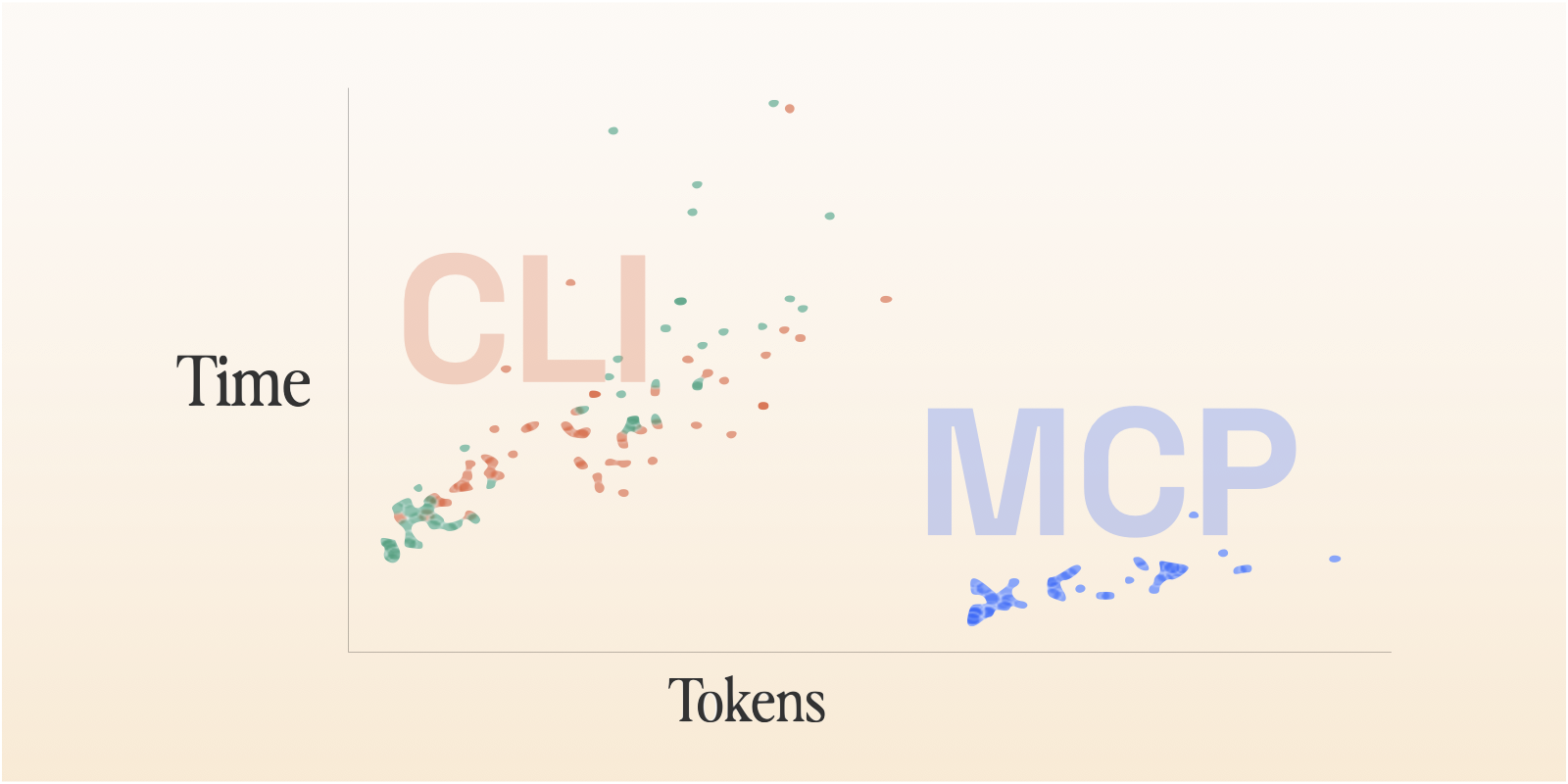
We implemented the same tool with Playwright MCP and Playwright CLI and ran simple benchmarks. Because the Playwright MCP and CLI cover exactly the same surface area, they’re a good case study for the debate around MCPs vs CLIs as agent tooling. We found that the CLI is dramatically more context efficient, but that context efficiency, surprisingly, does not correlate to speed! The MCP case consistently took about half the time as the CLI. It also doesn’t necessarily correlate to cost, and the MCP ended up slightly cheaper.
These findings point to an issue even more important than the transport layer itself: interface design. While exactly the same commands are exposed, the way the values are returned is quite different, resulting in many more total tool calls needed for the agent to use the CLI.
Background
For being less than a year and a half old, the Model Context Protocol (MCP) has had some wild swings in popularity in the developer world. In 2025, releasing an MCP became the de facto way for a company to say they embraced AI. They proliferated as one of the first real ways to give AI agents access to the world beyond their immediate runtime.
But while MCPs were being published and publicized daily, skepticism emerged. For agentic coding use cases, CLIs often already existed, offered the same access with better composability, and were so prevalent in agents’ training data that they could use them more fluently.
Along with those reasons, the main argument that took hold was that CLIs were dramatically more context efficient.
Loading an MCP into an agent’s tool descriptions can take tens of thousands of tokens. As of late August 2025, “Adding just the popular GitHub MCP defines 93 additional tools and swallows another 55,000 of those valuable tokens!” (Geoffrey Huntley, https://ghuntley.com/allocations/, as quoted by Simon Willison, https://simonwillison.net/2025/Aug/22/too-many-mcps/)
Not so hot take: if you use Claude Code, most of y’all’s MCP servers could be a shell script. Easier to maintain and faster and Claude uses just as well if not better.
I don't particularly like MCPs if I can avoid them - you can get a lot more functionality out of a CLI tool for a lot less token spend
From the author of the tweet above, Armin Ronacher, the full, thoughtful writeup: https://lucumr.pocoo.org/2025/7/3/tools/.
Playwright MCP at Ranger
At Ranger, we use the Playwright MCP extensively. It’s a major tool for our test writing and fixing agents to explore a site to ensure the tests are accurate and match reality. And our Ranger Feature Review CLI also uses it to verify the work of a coding agent.
We’re constantly on the lookout for changes to make the product better. Our targets are reliability, accuracy, and speed. For the Feature Review CLI, shipping a tool to users that includes an agent using a local MCP server is a lot of pieces that have to be set up successfully every single time and can be a debugging challenge.
The Playwright CLI was released in January, and we decided it was time to give this swap a try. If what everyone was saying was true, it would be a clear win all around. There are a million articles on how the CLI is more context efficient. It seemed likely to be more operationally reliable and easier to debug when it failed. I also assumed that this context efficiency would correlate to cheaper, faster runs.
Even the Playwright MCP docs themselves suggest users try the CLI instead:
Modern coding agents increasingly favor CLI–based workflows exposed as SKILLs over MCP because CLI invocations are more token-efficient: they avoid loading large tool schemas and verbose accessibility trees into the model context, allowing agents to act through concise, purpose-built commands.
So I set out to do some measurement while I was at it, to meet our promise to our customers that we were making the tool faster and more reliable. Given that I was already going to do the benchmarking, I decided to throw in agent-browser, an open source project from Vercel: browser automation CLI designed for agents and therefore even faster and more context efficient.
The Evals
The ranger CLI is designed to take a user workflow and test it in a browser, returning a verified/failed verdict at the end of a run. It also captures a playwright trace, a video, screenshots, and DOM snapshots while it works so it can demo the workflow to a user and give them a canvas to communicate changes back to the agent.
The baseline requirement is that it can correctly mark scenarios as passed or failed. To that end, I used two scenarios—one that should pass and one that should fail in a moderately subtle way. They both required about 10 separate steps (labeled below), which is about average for customer scenarios, and required a combination of navigation and checking expectations.
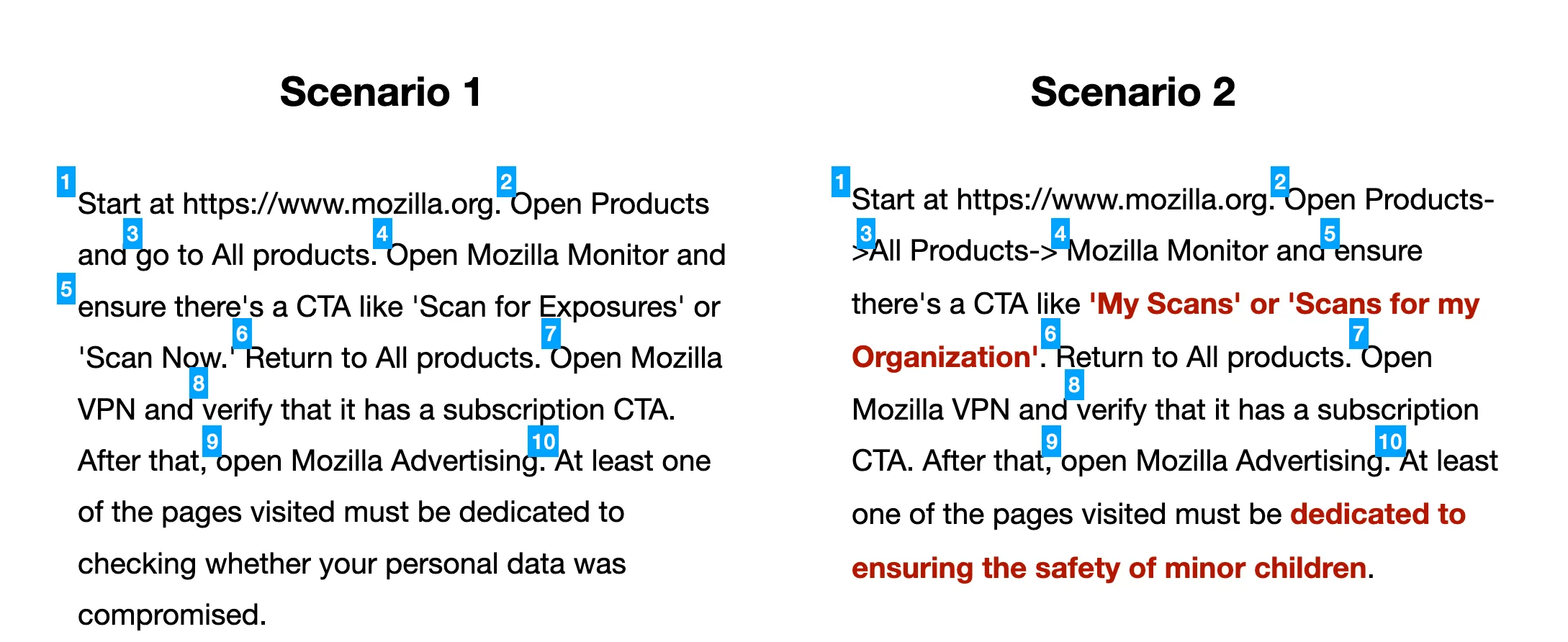
The agents should follow the same path for both scenarios, but the red text in Scenario 2 shows the changed assertions that should no longer be valid.
These are pretty simple scenarios compared to customer use cases that involve being logged into an app, performing stateful actions. I chose these scenarios to skip some of the auth and data setup/cleanup challenges in favor of a high-level sense of whether this swap made sense or not.
I also determined a rubric for each of these scenarios. With only two potential outcomes, guessing from partial data had a decent enough chance of working. One option (a future experiment!) would be to generate enough scenarios, and enough very hard ones, to truly separate the rigorous from the lucky agents. But applying a rubric to decide whether the agent had come to its conclusion for the right reason was a way to create a higher standard. The agent evaluating against the rubric looked through the conversation logs and artifacts generated for each run and determined whether the agent had 1/ visited each page it needed to, 2/ taken a screenshot/DOM snapshot for each relevant step, 3/ explicitly mentioned each of the verification criteria in its final output.
I also timed each run and counted the token usage and cost. I ran all of these with Sonnet 4.6, which is our default model in real usage. I did a trial with Haiku but quickly discovered that it failed at a dramatically higher rate and cut those experiments short.
Results
The hypotheses I specifically evaluated were:
- All of these tools will be effective and accurate.
- The Playwright CLI or agent-browser will be about as fast as the MCP.
- The CLI and agent-browser will be more context efficient and therefore cheaper.
In the end, only the first of these was completely confirmed.
Effectiveness
The topline result was that each of these tools was usable by the agent to complete the workflows, effectively always coming to the correct result. When graded against the rubric, the test runs achieved nearly perfect scores. Scenario 1 was verified every run. Every single Scenario 2 “agent findings” section correctly cited the two incorrect claims.
Essentially the only difference related to effectiveness was whether the agent decided Scenario 2 was “partially correct” or “failed”. The agents with the MCP preferred “failed”, those with the CLI preferred “partially correct” and those with agent-browser were split. I’m curious about the origin of these variations and don’t have an answer, but I think that either one is a defensible choice.
Speed
I expected the CLI and agent-browser to be effectively the same speed as or maybe even to be a bit faster than the MCP. If the former two are more context efficient, I reasoned, that probably makes for faster inference.
On this point, I was completely wrong.
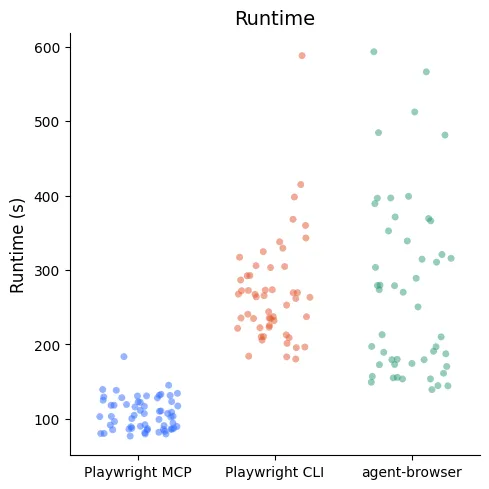
The Playwright MCP sessions were consistently around 90s for Scenario 1 and 120s for Scenario 2. The times for Playwright CLI and agent-browser doubled (or more!) those times, with dramatically more variability. Some runs took up to 10 minutes to complete.
Within each scenario, the slowest MCP run was faster than the fastest run of either of the CLIs.
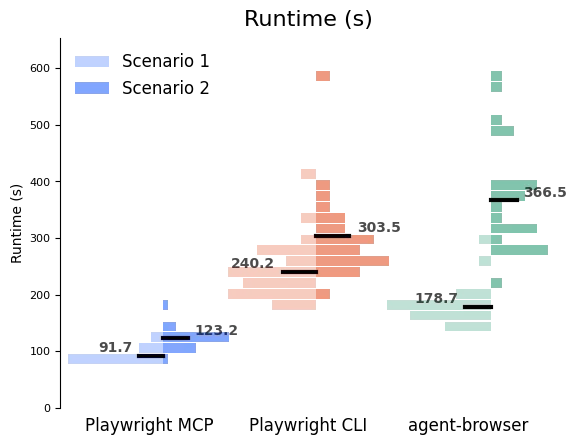
Runtime data distributions down by scenario, showing that—within each scenario—the slowest runs with the MCP were faster than the fastest runs of either of the CLIs.
The obvious question (“why?!”) also turned out to have a very clear answer: the agents used dramatically more tool calls (2-3x) to accomplish the same goal with the CLIs.
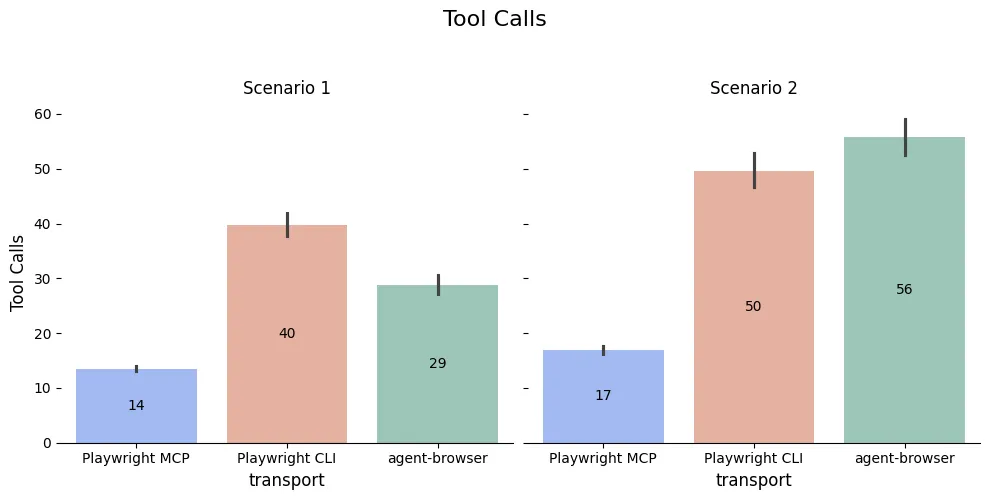
Each tool call has its own overhead, but it also requires an extra roundtrip to the Anthropic servers to decide what to do with the results.
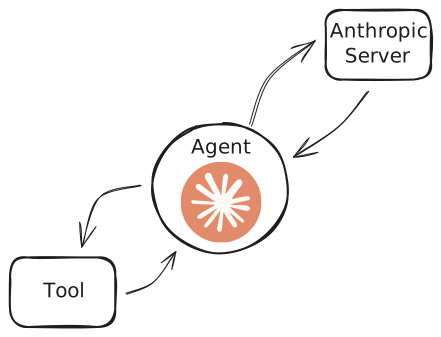
But why did the CLI agents need so many tool calls? Because the interfaces of the MCP and the CLI are actually substantially different, not just a different protocol.
Nearly all of the MCP tools (browser_click, for instance) return a large amount of metadata and info about the page’s current state, including the window’s accessibility tree snapshot. That takes up a lot of context! But it also means that the agent knows exactly where it stands after each call.
The CLI, on the other hand, puts the page snapshot into a yaml file and returns that path in the response. That’s way more token efficient because the full page content isn’t shoved into the agent’s context automatically. But in most of these use cases, the agent then had to use another tool call to interact with that file — usually grepping for a field to find a reference or reading the whole file into context. The overall context use may be smaller, but the extra round trip(s) to make tool calls add a lot of extra time.
> playwright-cli click e37
### Ran Playwright code
```js
await page.getByRole('link', { name: 'Get started' }).click();
### Page
- Page URL: https://playwright.dev/docs/intro
- Page Title: Installation | Playwright
### Snapshot
- [Snapshot](.playwright-cli/page-2026-03-26T16-21-40-845Z.yml)
The Playwright CLI returns the page snapshot in a file, which means it’s not automatically read by the agent. That’s good for context usage, but it means that the agent has to spend an extra turn doing a tool call (usually Grep) to understand the current browser state.
These extra tool calls weren’t the agents making suboptimal choices. They were the only way to understand the page the agent found itself on and accomplish the task.
The agent-browser case is similar. The click command only returns whether the command succeeded/failed. The agent must also run additional commands to get access to metadata and the state of the page.
> agent-browser click @e14
✓ Done
> agent-browser get url
https://playwright.dev/docs/intro
> agent-browser snapshot
- generic [ref=e1] clickable [onclick]
  - region "Skip to main content" [ref=e2]
    - link "Skip to main content" [ref=e4]
  - navigation "Main" [ref=e3]
    - link "Playwright logo Playwright" [ref=e5]
      - image "Playwright logo"
      - StaticText "Playwright"
    - link "Docs" [ref=e6]
    - link "API" [ref=e7]
    - button "Node.js" [expanded=false, ref=e13]
...
You can see these patterns in action even more by looking at the types of tool calls made.
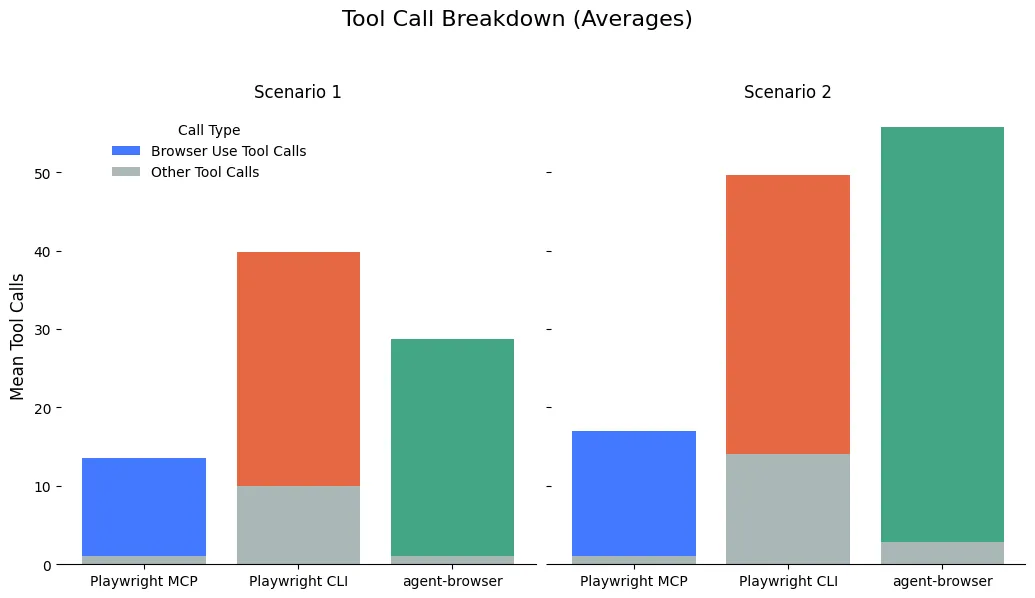
The Playwright MCP runs usually use only one non-browser-use (e.g. anything other than Playwright MCP, Playwright CLI, or agent-browser) tool call because all the information they need comes straight from the MCP. The Playwright CLI always has to follow up with at least one Grep or ReadFile command to formulate its next step. agent-browser requires at least two CLI commands (an action, and then getting the snapshot), but it doesn’t have to grep much because the snapshot is returned directly from the CLI.
Context Efficiency & Cost
That brings us to our third data hypothesis: context efficiency. This is one of the big arguments against MCPs in general, and the Playwright MCP in particular.
The interface approach used by both CLIs is objectively and enormously more context efficient because it automatically returns so much less information. It’s clear in our benchmarks — the Playwright CLI and agent-browser average about 22k-24k tokens to complete scenario 1. The MCP requires 50k.
The numbers below are the token volume at the point of the last assistant message.
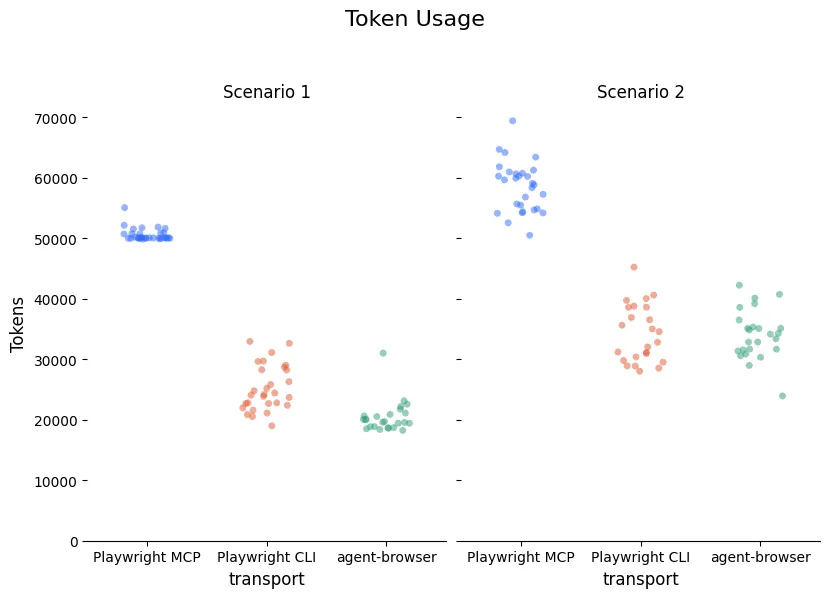
Token volume at the point of the last assistant message. This is a good proxy for how full the context window is. It includes input, output, cache creation, and cache-read tokens for that final request, but it does not include the full cumulative cache-read volume across earlier turns
The automatic return of the full state means that the Playwright MCP cases are forced to ingest a lot of tokens that they may not need. Both CLIs allow the agent to specifically request or search for the context that it needs after each command.
Does this token efficiency translate to being cheaper? Not necessarily. The costs for all three transports ended up being pretty similar, with a slight edge for the MCP on the more complicated scenario.
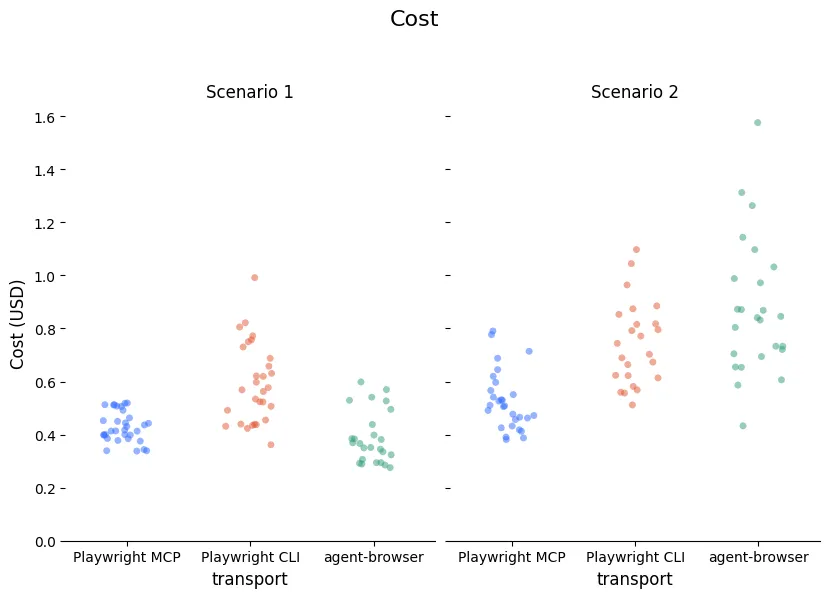
If we pay by the token, why don’t tokens used translate directly into the costs? There are two contributing factors. One of them is related to the way the tokens above are counted. As mentioned, those numbers show how full the context window is at the end of the conversation. But the cached tokens are re-read on every single conversation turn. The number of turns for the CLIs means that these tokens are counted (though at a lower rate!) on many more turns. With this factored in, it becomes closer to a linear relationship, but the MCP points are still on a slightly different line.
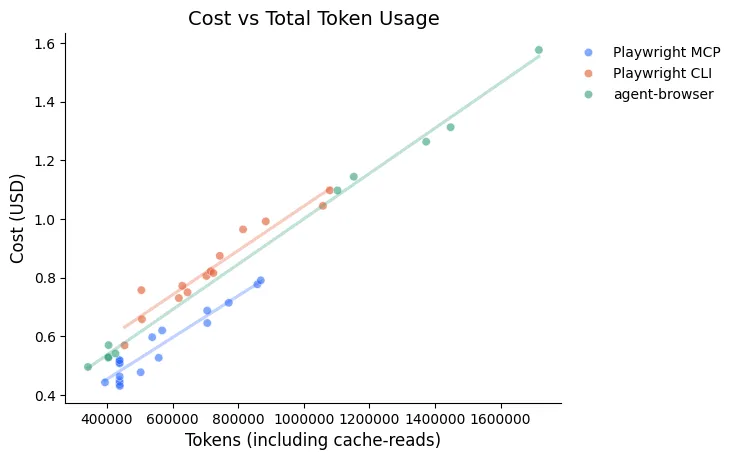
That discrepancy is explained by output tokens. More tool uses means more conversational turns which means more opportunity for output and more output that needs to be specified to define each tool usage.
I dug into a few examples of each transport for specific numbers, so these aren’t overall averages (all examples are for Scenario 1).
These are representative runs, not overall averages. The table combines token volume, billing buckets, and total cost to compare where the extra spend actually comes from.
| Output $15 / MTok | Input $3 / MTok | Cache-write $3.75 / MTok | Cache-read $0.30 / MTok | |||||||
|---|---|---|---|---|---|---|---|---|---|---|
| Transport | Turns | Tokens | Cost | Tokens | Cost | Tokens | Cost | Tokens | Cost | Total cost |
| mcp | 15 | 2401 | $0.04 | 17k | $0.05 | 46.4k | $0.17 | 438k | $0.13 | $0.39 |
| cli | 42 | 8380 | $0.13 | 43.5k | $0.13 | 26.5k | $0.10 | 642k | $0.19 | $0.54 |
| agent-browser | 30 | 6398 | $0.10 | 32k | $0.10 | 18.2k | $0.07 | 417k | $0.13 | $0.39 |
The notable differences between MCP and CLI are in output token cost ($0.04 vs $0.13) and input tokens ($0.05 vs $0.13). The cache-writes (advantage CLI) and cache-reads (advantage MCP) end up effectively cancelling out ($0.30 vs $0.29).
Conclusion
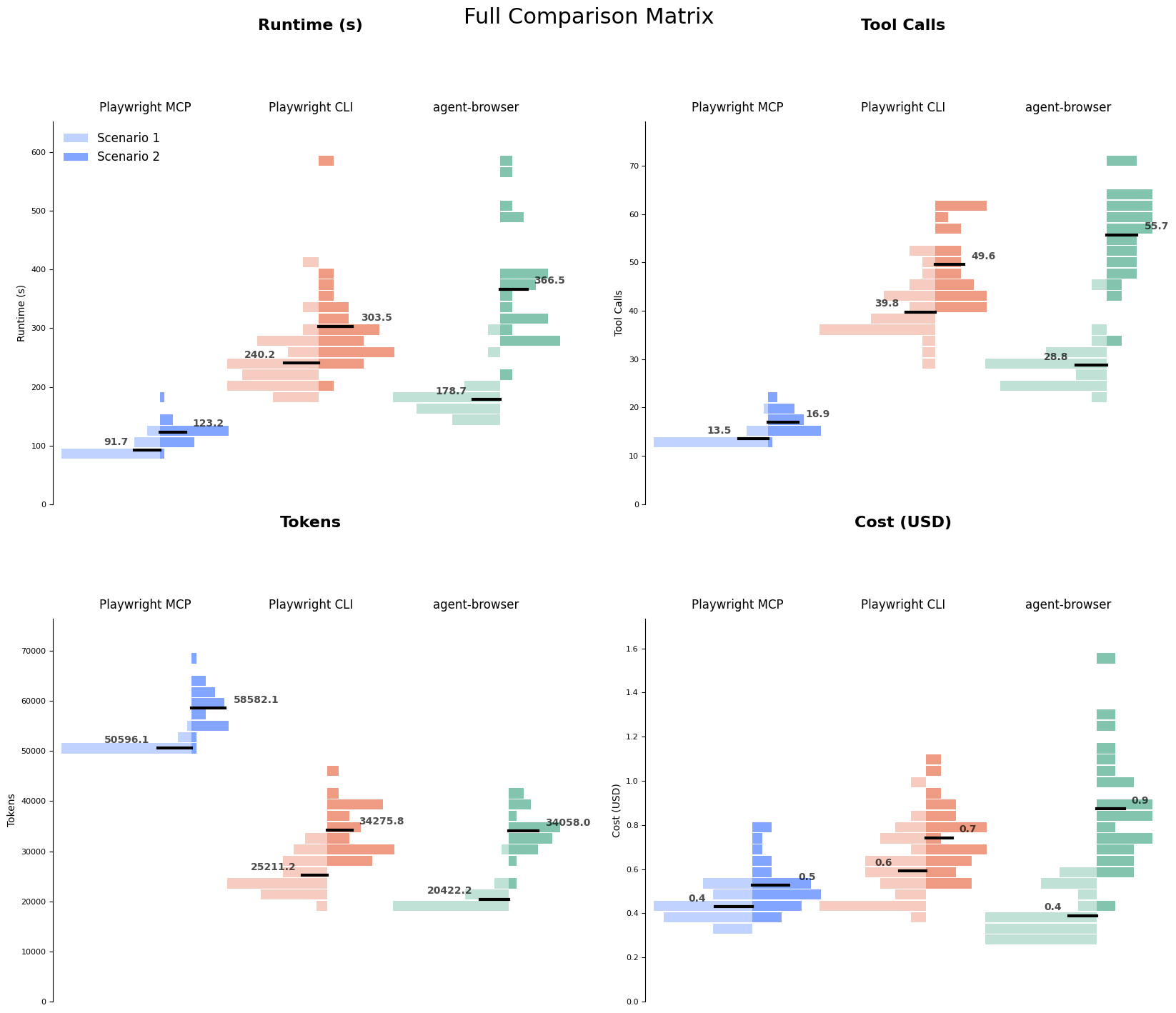
This picture is a lot more complicated than I expected going into it! Speaking of complicated pictures, if you want a full sense of the data involved, check out the graph in the appendix.
What emerged is not really a comparison of MCPs vs CLIs – it’s a comparison of the specific interface choices of the Playwright and agent-browser tools.
The MCP used up a lot of the context window by returning all state information on every run. The CLI and agent-browser both returned much less information, leaving it up to the agent to directly query the information it needed. That meant less of the context window was used, but more tool calls were required and tool calls were the most direct corollary to timing.
Are these the right tradeoffs? As always: it depends!
- Does clock runtime matter for your application? Minimizing tool calls will be more performant.
- Are you trying to complete many tasks within a single agent session? Optimizing for context usage will allow you to do more work before context rot kicks in.
- Can the agent plan a number of actions without needing to check the page state in between? Maybe you can get the best of both worlds and manage to minimize tool calls while still using the Playwright CLI or agent-browser.
What now?
One possible conclusion is just that we should stick with our current solution, using the MCP.
If our goal was just to maximize our performance, this would make a lot of sense. But our priorities also include increasing the reliability, so the CLI still has some advantages worth pursuing.
My next experiment will be making the CLI behave a bit more like the MCP — perhaps a wrapper around the CLI that adds commands like click-and-see-state that automatically appends the contents of the accessibility tree YAML onto the end of the returned value. I’m curious whether we should use wrapped commands by default (basically mimicking the MCP behavior) or allow the agent to decide whether it needs the full state or not for each action. Stay tuned for more results & possibly a framework to run all these benchmarks with your own favorite browser automation tools.
Appendix
The “everything chart”
I thought this graph could replace the entire blog post, but wiser editors suggested more focused visualizations. Distributions for each scenario and transport across runtime, tool calls, tokens, and cost.
Take a look at the data
Find the raw data and some additional visualizations that didn’t make the cut in a Jupyter notebook.
References and Further Reading
-
https://lucumr.pocoo.org/2025/7/3/tools/ - Armin Ronacher, Tools: Code Is All You Need, 2025-07-03
One of the very influential early takes on why MCPs are lacking for coding agent tasks. It argues that CLIs are sometimes better, but writing code/scripts directly is almost always better. -
https://mariozechner.at/posts/2025-08-15-mcp-vs-cli/ - Mario Zechner, MCP vs CLI: Benchmarking Tools for Coding Agents, 2025-08-15
Actual benchmarks on a terminal control MCP vs CLI vs traditional human-aimed tooling (tmux & screen). Compares success rates, cost, token usage, and time.
“The MCP version was 23% faster (51m vs 66m) and 2.5% cheaper ($19.45 vs $19.95).”
My takeaway? Maybe instead of arguing about MCP vs CLI, we should start building better tools. The protocol is just plumbing. What matters is whether your tool helps or hinders the agent’s ability to complete tasks.
-
https://oneuptime.com/blog/post/2026-02-03-cli-is-the-new-mcp/view#the-ai-agent-perspective - Nawaz Dhandala, Why CLI is the New MCP for AI Agents, 2026-02-03
-
https://x.com/ericzakariasson/status/2036762680401223946 - Building CLIs for agents, 2026-03-25